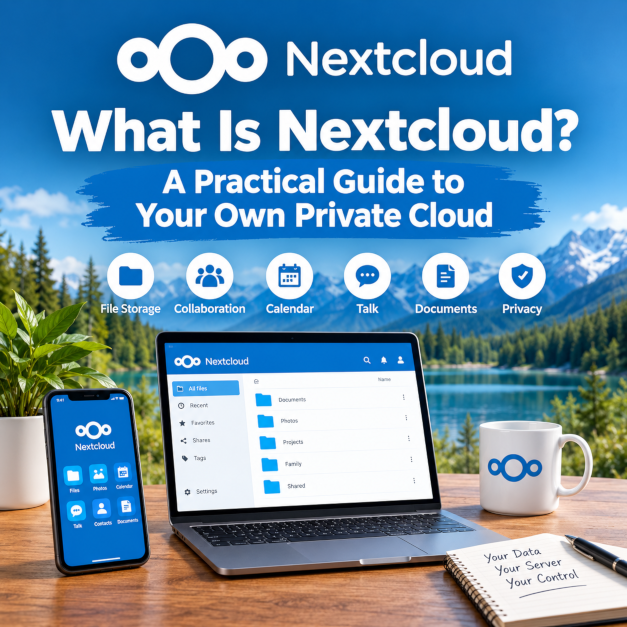
What Is Nextcloud? A Practical Guide to Your Own Private Cloud
What if you could have your own cloud storage, access your files from anywhere, and share documents without relying entirely on Google, Microsoft, or Dropbox? That's the idea behind Nextcloud.
Cloud storage has become part of everyday life. We use it to back up photos, store documents, share files, and access our information across multiple devices. Services such as OneDrive, Google Drive, and Dropbox make these tasks convenient, but they also mean trusting an external provider to host our data.
Nextcloud offers another option: run your own cloud platform and decide where your data lives, who can access it, and how it is managed.
I've been running Nextcloud in my own homelab, and it's one of the projects I genuinely enjoy using. In this guide, I'll explain what Nextcloud is, what it can do, how self-hosting works, and what you should consider before setting up your own private cloud.
What Is Nextcloud?
Nextcloud is an open-source platform for storing, synchronizing, sharing, and collaborating on files. It can run on a server you own or on infrastructure provided by a hosting company of your choice.
Think of it as a platform that can provide many of the features people associate with cloud storage and online collaboration services, while giving you greater control over the underlying infrastructure.
At its simplest, Nextcloud lets you upload files to your server and access them through a web browser. You can also install applications on your computer or phone to synchronize files and keep your information available across devices.
However, Nextcloud can do considerably more than store files.
Depending on the applications you install and configure, you can use it for:
- File storage and synchronization: Keep documents, photos, and other files in one place and access them across devices.
- File sharing: Share individual files or folders with other users, or create links for people outside your Nextcloud installation.
- Calendar and contacts: Manage appointments, events, and contact information.
- Document collaboration: Work with documents, spreadsheets, and presentations through supported online office integrations.
- Communication: Use Nextcloud Talk for messaging, voice calls, and video conferencing.
- Notes and task management: Organize information and manage work through available applications.
- Mobile access: Browse, upload, download, and manage files from supported mobile devices.
Not every feature is included or enabled by default. The capabilities available to you depend on your Nextcloud version, installed applications, integrations, and configuration.
You can explore the available capabilities on the official Nextcloud website.
How Does a Private Cloud Work?
The word cloud can make the technology sound complicated, but the basic idea is straightforward.
When you upload a file to a typical cloud storage service, the file is stored on infrastructure managed by that provider. You access it through their website or application.
With a self-hosted Nextcloud installation, you run the software on a server that you control or arrange for a hosting provider to run it on your behalf.
Here's how a typical setup works:
- You install Nextcloud on a server. This could be a computer at home, a dedicated server, or a virtual machine.
- You configure storage. Your files are stored on the server's storage system, according to your configuration.
- You connect your devices. You can access your files through a browser or supported desktop and mobile applications.
- You synchronize and share files. Nextcloud allows you to work with your files across devices and control how you share them.
- You maintain the environment. You are responsible for ensuring that the server, software, storage, and backups remain properly maintained, unless you have delegated those responsibilities to a provider.
For example, imagine taking a photo on your phone and wanting to access it from your computer later. With a suitable Nextcloud configuration, you can upload the photo from your phone and retrieve it from another device without relying on a separate cloud storage account from a major technology company.
Your devices communicate with your Nextcloud server, which stores and serves the files.
The important distinction is that you have more control over where your data is stored and how the service is operated. That control also comes with additional responsibilities.
Why Would You Want to Run Nextcloud?
There are several reasons people choose Nextcloud, but three stand out: control, flexibility, and independence.
1. You Control Where Your Data Lives
When you use a hosted cloud service, the provider operates the infrastructure that stores your information.
With Nextcloud, you can choose to keep your data on hardware in your home or office, on a server in a data centre, or with a hosting provider you trust.
For some people, the appeal is simply knowing where their files are stored. For others, it is about having greater control over how information is managed and who can access it.
This can be particularly relevant to people who want to reduce their dependence on large cloud providers or organizations that have specific data residency and privacy requirements.
However, self-hosting does not automatically make your data private or secure. Your server still needs appropriate access controls, encryption where suitable, updates, and secure configuration.
2. You Can Access Your Files From Anywhere
A private cloud doesn't have to be accessible only from your home network.
With the appropriate network configuration, domain name, HTTPS, and security controls, you can access your Nextcloud installation remotely.
This means you can retrieve a document while travelling, share files with family members, or access information from another computer without having to be physically connected to your home network.
Remote access does introduce additional security considerations. If you expose a server to the internet, you need to keep the software updated and protect the service against unauthorized access.
You can also choose a more restrictive setup if remote access isn't necessary for your needs.
3. You Aren't Locked Into One Hardware Platform
Nextcloud is software, not a specific computer or storage appliance.
You can install it on suitable Linux-based infrastructure, use virtualization, or deploy it through supported installation methods.
For homelab enthusiasts, this flexibility is particularly useful. You might already have a small server running other services, or you might prefer to dedicate a separate machine to your private cloud.
As your requirements change, you can plan a migration to different hardware or hosting infrastructure. The exact process depends on your installation, storage layout, database, and other configuration details.
The flexibility is valuable, but moving a live installation still requires planning and testing.
4. You Can Expand It Beyond File Storage
Nextcloud is more than a replacement for a basic network drive.
Its application ecosystem allows you to add capabilities as you need them. You might start with file storage and synchronization, then explore calendar management, contacts, document collaboration, or other supported applications.
For a household, this could mean consolidating some personal services into one platform.
For a small organization, it could provide a place to store and share files while supporting selected collaboration tools.
You don't need to deploy every available application. In fact, starting with the features you actually need is usually the more sensible approach.
Nextcloud vs. OneDrive, Google Drive, and Dropbox
If you're considering Nextcloud, you probably already use one of these services.
So, how does it compare?
The most important difference isn't simply the feature list. It is who operates the service and who is responsible for maintaining it.
| Feature | Self-hosted Nextcloud | Typical hosted cloud service |
|---|---|---|
| Infrastructure | You choose and manage the hosting environment, or select a hosting provider. | The service provider manages the underlying infrastructure. |
| Data location | Depends on where you host the server and configure storage. | Depends on the provider's infrastructure and available account or organizational settings. |
| Maintenance | You or your hosting provider must manage updates, backups, and administration. | The provider manages most underlying infrastructure maintenance. |
| File synchronization | Available through supported Nextcloud clients. | Available through the provider's applications. |
| File sharing | Configurable sharing permissions and links. | Sharing features and restrictions depend on the service. |
| Collaboration | Available through Nextcloud applications and integrations. | Available through the provider's integrated tools and ecosystem. |
| Customization | You can control the server environment and choose supported applications. | Customization depends on the provider's offerings. |
| Cost | Software can be used without a standard per-user subscription, but hosting, storage, maintenance, and other costs may apply. | Pricing depends on the provider, storage allowance, and subscription plan. |
| Technical responsibility | Greater responsibility if you self-host. | Generally less responsibility for the underlying infrastructure. |
This isn't a claim that Nextcloud is automatically better than every commercial alternative. Each option has advantages.
OneDrive, for example, can be particularly convenient for people who already work extensively with Microsoft 365. Google Drive offers a similarly integrated experience for users of Google's services.
Nextcloud is worth considering if you want greater control over your hosting environment, prefer open-source software, or want to operate your own collaboration platform.
If your priority is having a service that works with minimal administration, a managed cloud service may be the better fit.
The right choice depends on what you value most.
Is Nextcloud Free?
The Nextcloud software is open source and can be downloaded and used without purchasing a conventional per-user cloud storage subscription.
However, running your own cloud is not necessarily free.
Your actual costs depend on how you deploy it.
If you already have a suitable server and sufficient storage, you may be able to get started without buying additional hardware.
If you need a dedicated machine, additional disks, a domain name, or hosted infrastructure, your costs will increase.
You should also consider the time required to maintain the installation.
For personal use, a small existing server may be sufficient. For a business, the calculation is different: administration, availability, support, backup infrastructure, and security requirements all need to be considered.
There may also be commercial support options available for organizations that need assistance.
My recommendation is to start with the infrastructure you already have, if it is suitable, and evaluate the ongoing requirements before investing in dedicated hardware.
Can You Run Nextcloud at Home?
Absolutely. A home installation is one of the reasons Nextcloud appeals to homelab enthusiasts.
You don't need a large enterprise server to experiment with a private cloud. A suitably configured computer or virtual machine can be enough for a small personal installation.
The hardware you need depends on the number of users, the amount of data you store, the applications you enable, and the performance you expect.
There are several ways to deploy Nextcloud.
Install Nextcloud in a Virtual Machine
If you're already running a virtualization platform such as Proxmox, you can create a virtual machine for Nextcloud.
This allows you to separate the service from other workloads running on the same physical hardware.
You can allocate CPU, memory, and storage according to your needs, and manage the virtual machine alongside your other homelab systems.
Virtualization is a good option for people who already operate a home server and want to keep their services organized.
Use Nextcloud All-in-One
Nextcloud All-in-One, commonly called Nextcloud AIO, is an official installation method designed to simplify deployment and maintenance.
It uses Docker to deploy Nextcloud alongside supporting components. Depending on your configuration, it can include optional services such as online office functionality, a backup solution, and other integrations.
AIO can reduce the work involved in assembling and maintaining the various components yourself, although it still requires you to understand the underlying server, storage, networking, and backup requirements.
You can find installation details in the official Nextcloud administration documentation.
Use a Hosted Server
Self-hosting doesn't necessarily mean keeping a physical computer in your home.
You can run Nextcloud on a rented virtual private server or other hosting infrastructure.
This can make remote access and hardware management easier, depending on the provider and configuration.
However, you still need to consider the provider's security practices, data location, backup options, costs, and the amount of administration you want to handle yourself.
The key decision is not whether the server is physically in your house. It is how much control and responsibility you want over the service.
Is Nextcloud Secure?
Security is an important consideration whenever you store personal documents, photographs, or business information online.
Nextcloud provides security features that can help protect an installation, including access controls, support for two-factor authentication, file-sharing restrictions, and encryption options.
Administrators can also configure policies to control how users access and share information.
However, it is important to understand what these features do and what they don't do.
Running Nextcloud does not automatically make your files secure. The security of your installation depends on the entire environment, including the server operating system, Nextcloud software, network configuration, user accounts, and storage.
Here are some basic practices worth following:
- Keep Nextcloud and its underlying components updated.
- Use strong, unique passwords and enable two-factor authentication where appropriate.
- Use HTTPS for connections to your server.
- Restrict administrative access and avoid exposing unnecessary services to the internet.
- Review user permissions and public sharing links.
- Monitor security warnings and investigate suspicious activity.
- Maintain backups that can be restored if something goes wrong.
- Test your recovery process rather than assuming your backups work.
Encryption also deserves attention. Protecting connections with HTTPS is different from encrypting stored files, and both differ from end-to-end encryption.
With ordinary server-side storage, the server generally needs access to the data to provide its normal functionality. End-to-end encryption can provide stronger confidentiality for supported workflows, but it has specific configuration and usability considerations.
If you're running Nextcloud for a business, you should evaluate the entire deployment against your security, operational, and compliance requirements.
For a personal homelab, the same principle applies: start with a secure configuration and take responsibility for maintaining it.
What Are the Downsides of Nextcloud?
I enjoy running Nextcloud, but self-hosting isn't the right solution for everyone.
There are some trade-offs worth understanding before you commit.
You Are Responsible for Maintenance
When you operate your own server, someone needs to look after it.
That includes software updates, storage management, monitoring, backups, and troubleshooting.
Automated installation tools can simplify some tasks, but they don't remove the need for ongoing administration.
If you don't enjoy maintaining technology, a managed hosting provider or conventional cloud service may be more appropriate.
Backups Are Your Responsibility
A private cloud can become the primary location for important documents and photographs. If the underlying storage fails and you don't have a usable backup, you could lose that data.
Running Nextcloud on a server with redundant storage does not eliminate this risk. Neither does taking a snapshot without considering how to recover the application and its data consistently.
Your backup plan should account for the files, database, configuration, and any other components required to restore your installation.
Ideally, keep a separate backup copy that would survive a failure or compromise of the main server.
Remote Access Takes Planning
Accessing Nextcloud outside your home network requires an appropriate network and security configuration.
Depending on your internet connection and deployment, you may need to configure DNS, HTTPS, a reverse proxy, firewall rules, or other components.
Some internet providers use carrier-grade NAT, which can complicate traditional inbound connections.
If you aren't comfortable managing these pieces, investigate a suitable hosted option or a deployment method designed for your circumstances.
Performance Depends on Your Setup
A slow server, limited storage performance, inadequate network bandwidth, or an overloaded database can affect the user experience.
Your home internet upload speed can also matter when accessing files remotely.
The software itself is only one part of the equation. The hardware and infrastructure you choose will influence how well the service performs.
Some Features Require Additional Components
Not every capability is built into a basic installation.
Online document editing, video calling enhancements, and other advanced functions may require additional applications, services, or configuration.
This isn't necessarily a problem, but you should understand the requirements before expecting a self-hosted installation to replicate every feature of a fully managed commercial service.
My Experience Running Nextcloud in a Homelab
I run Nextcloud in my own homelab, where it operates alongside other self-hosted services.
My environment uses Proxmox for virtualization, with Nextcloud running in an Ubuntu virtual machine through Nextcloud AIO.
I like being able to access my files through a browser and maintain control over the environment in which they are stored. I also appreciate the flexibility to run the software on infrastructure I manage myself.
For me, Nextcloud represents something broader than an alternative place to store files. It is an example of how open-source software can give individuals more choices about how they manage their own technology.
That doesn't mean everyone needs to run a server at home. There is real value in managed services, and I understand why many people prefer not to maintain their own infrastructure.
But if you enjoy technology, want to learn more about self-hosting, or simply want greater control over your files, Nextcloud is worth exploring.
My advice is to begin with the basics. Get file storage and access working reliably, establish a backup routine, and become comfortable maintaining the installation before adding more services.
You can expand from there as your needs evolve.
Is Nextcloud Right for You?
Nextcloud is worth considering if you want to:
- Store files on infrastructure you control.
- Access documents across multiple devices.
- Share files without depending entirely on a third-party storage platform.
- Explore open-source alternatives to conventional cloud services.
- Learn more about Linux servers, virtualization, and self-hosting.
- Build a private collaboration environment for your household or organization.
It may be less suitable if you want a completely hands-off service, don't want to manage backups, or rely on specific integrations that are easier to use within an established commercial ecosystem.
For organizations, the decision should also account for support, availability, security, compliance, and ongoing operational costs.
There is no single solution that fits everyone. The important thing is understanding your requirements and choosing a platform that meets them.
Getting Started With Nextcloud
If you're interested in trying Nextcloud, start by exploring the official website and its installation documentation.
You can investigate the available features, learn about deployment options, and decide whether you want to install it on your own hardware or use a hosting provider.
Official resources:
If you're new to self-hosting, take your time with the initial setup. Plan your storage, secure the installation, and establish backups before relying on it for important files.
Once the basics are working, you can explore additional applications and capabilities.
Final Thoughts
Cloud storage is convenient, but you don't have to rely exclusively on services operated by major technology companies.
Nextcloud provides an open-source alternative that lets you operate your own file storage and collaboration platform, with control over the hosting environment and the ability to expand its functionality.
That freedom comes with responsibility. You'll need to maintain the installation, protect it against security threats, and make sure your data can be recovered if something goes wrong.
For people who value privacy, flexibility, and learning how their technology works, those responsibilities may be a worthwhile trade-off.
I enjoy running Nextcloud in my homelab, and I believe more people should know that this option exists.
You don't have to be an enterprise or a technology professional to start exploring the idea of a private cloud. With the right setup and a little patience, you can begin taking greater control of where your files live and how you access them.
Have you tried Nextcloud, or are you considering running your own private cloud? I'd be interested to hear about your experience.
As always, if you have questions or want help setting this up, reach out through the Need Help? page.
#Nextcloud #PrivateCloud #SelfHosting #Homelab #Proxmox #OpenSource #TechTips